Website Optimization 01: disable ETag in apache (debian/ubuntu)
From last few months i am working to optimize our somewhereinblog.net server, because right now we are getting huge amount of hits everyday (1,00,000 + hits). In this series i will describe the tricks that i learned 🙂
On my first post of this searies i will talk about ETag. Before disable this, first we need to know what is ETags. From wikipedia:
An ETag (entity tag) is an HTTP response header returned by an HTTP/1.1 compliant web server used to determine change in content at a given URL. When a new HTTP response contains the same ETag as an older HTTP response, the contents are determined to be the same without further downloading. The header is useful for intermediary devices that perform caching, as well as for client web browsers that cache results. One method of generating the ETag is based on the last modified time of the file and the size of the file.
In certain situations, ETags may not improve the performance of a web application. For instance, some ETag generation schemes incorporate the file’s inode on the system. The file’s inode is unique to the file only on one specific machine. If a site has multiple servers, each with its own copy of the file (i.e. load balancing), then a user’s request for the same file may get served by a different machine. In that case, the inode will almost certainly be different and, if it is used to generate the ETag, it will cause the file to be re-downloaded.
So, this is not always helpfull for all type of sites. Always remember, if you are not using anything, you should not enable or kept enable on server.
Apache by default enable this ETags. We need to disable this to get better performance. Here i am describing the steps for debian and ubuntu linux.
We will take help from mod_header to disable ETags, so first we need to enable the mod_header (apache module)
sudo a2enmod header
sudo /etc/init.d/apache2 restart
this command will enable mod_header. Now open /etc/apache2/apache2.conf with your faviourate browser.
sudo nano /etc/apache2/apache2.conf
then paste the under given code to this apache2.conf file
Header unset ETag
FileETag None
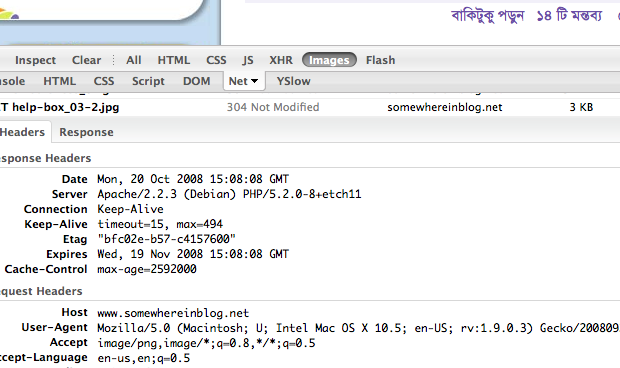
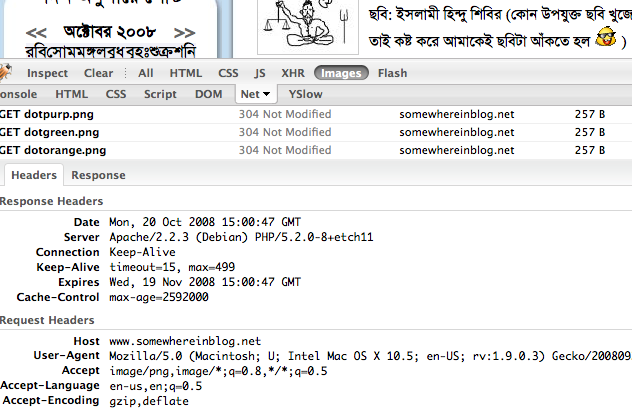
now restart the apache2, and check if it working or not. If every thing OK, then you will not see the etags anymore 🙂
For better understanding i am giving you 2 screenshots.
Before ETag disable
After ETag disable:
If you don’t have root access to server, you still can do this from .htaccess , just copy that code to .htaccess instate of apache conf file.
Ask me if you have any question or problem about ETag.