Stop referrer spam on your site

February 14th, 2011 11 comments

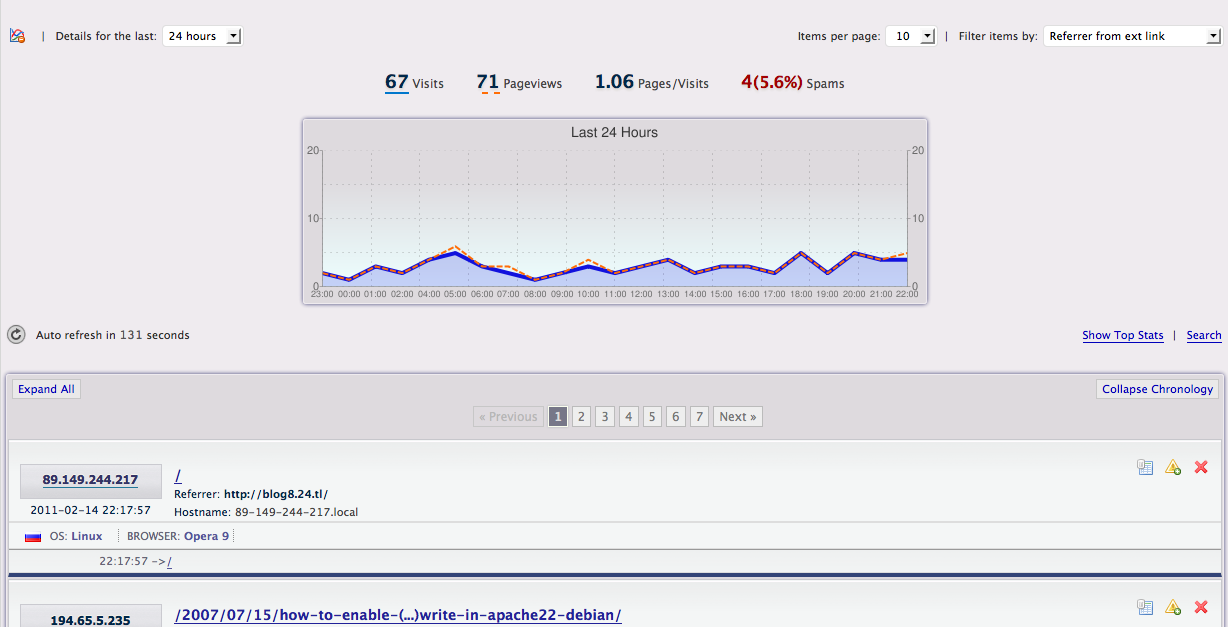
As i was checking WassUp stats of my blog, suddenly i found that my blog got 71 visits from some external sites (referrer) in last 24 hours. First my felling was “WOW, so may referrer”.

referrer spam

referrer spam


*screenshot: showing external referrer excluding search engines.

Later after i check some of those referring sites, i found these are just some sites, that using my site to get better position in site ranking. It’s call “referrer spam”. From wikipedia:

Referrer spam (also known as log spam or referrer bombing[1]) is a kind of spamdexing (spamming aimed at search engines). The technique involves making repeated web site requests using a fake referrer url that points to the site the spammer wishes to advertise.[2] Sites that publicize their access logs, including referrer statistics, will then end up linking to the spammer’s site, which will in turn be indexed by the search engines as they crawl the access logs.

This benefits the spammer because of the free link, and also gives the spammer’s site improved search engine ranking due to link-counting algorithms that search engines use.

Though these visits will not loss you any thing, but it will just waste your server resource. And also if you show some stats on your site like referrer, then your visitors will get some wrong links.

Ok lets see how we can stop them. I searched on net, but didn’t got any good solution. So here is my solution.

Just add these lines to your .htaccess file and smile.

Order Allow,Deny
Deny from 195.54.42.56
Deny from 89.149.244.217
Deny from 78.137.7.99
Deny from 94.142.134.155
Allow from all

Here i use ip to block/stop this abuse, because after some research i fount this is happening from just particular ips, means those ips running some scripts to do this. Its semi manual way (still looking for better way). Just get these ips from your access log or any 3rd party plugins or apps. then add “Deny from newip” before Allow from all .

That’s all . If you know any better option please share with us.

Views :2245

Popularity: unranked [?]

Make/converting eot from ttf in mac os x & linux

February 7th, 2011 2 comments

As i work with some bangla sites, it’s very common problem for me to create eot of bangla true type font. Today i got a really simple solution. Now (As just learned the system) you can create or convert eot from any ttf font from mac or linux with simple one line command.

$ ttf2eot < fontname.ttf > fontname.eot

That’s all!!!! .

Wait, little work left, you have to install ttf2eot :
in mac os x: sudo port install ttf2eot
linux : download the latest source from http://code.google.com/p/ttf2eot/downloads/list , extract it, then run make in the extracted folder. then you good to go. “./ttf2eot < input.ttf > output.eot”

Views :2276

Popularity: unranked [?]

Set/change default application on mac os x

October 5th, 2010 1 comment

Are you bored with clicking the right click every time to select your fav application to open a file ? At least i am , i like VLC very much and using it for last few years as my media player.

After searching on google i got a very good application to that and plus is it’s free :) , and the site – RCDefaultApp

more data from their site

RCDefaultApp is a Mac OS X 10.2 or higher preference pane that allows a user to set the default application used for various URL schemes, file extensions, file types, MIME types, and Uniform Type Identifiers (or UTIs; MacOS 10.4 only). MacOS X uses the extension and file type settings to choose the application when opening a file in Finder, while Safari and other applications use the URL and MIME type settings at other times for content not related to a file (such as an unknown URL protocol, or a media stream).

RCDefaultApp also allows setting the application when digital cameras or FireWire webcams such as iSight are connected to the computer. For completeness’ sake, there are also settings that mimic the existing “CDs and DVDs” preference pane, which allows setting the action to take when various types of CDs and DVDs are inserted into the computer.

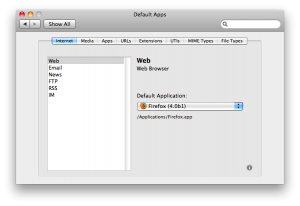
This screenshot shows the section where the default application for various Internet services can be set, similar to the preference in Safari.app and Mail.app.

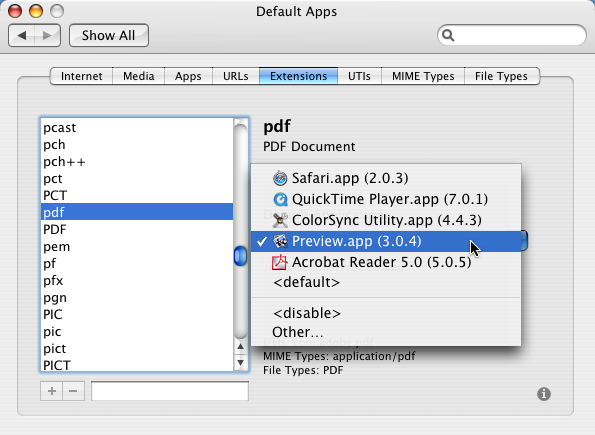
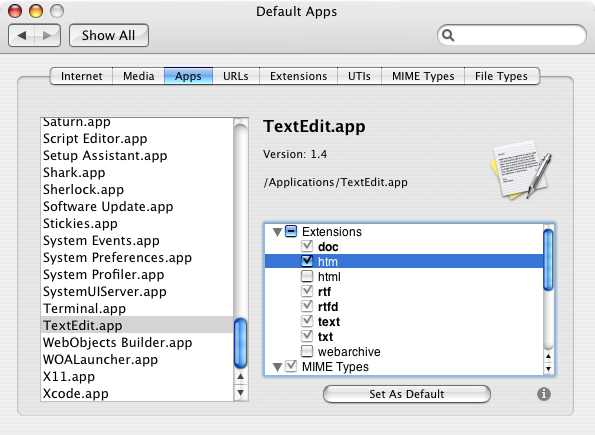
This shows how to set the application for an extension; just pick the desired application from the list.

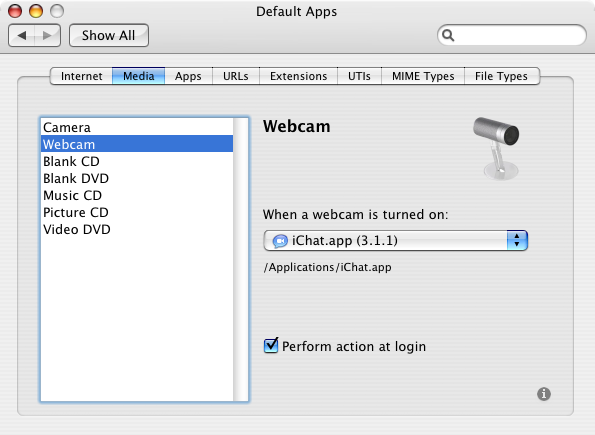
This shows the section to set the action for when various types of media are inserted or turned on, similar to the preference in Image Capture.app and iChat.app. The CD and DVD preferences are also duplicated here with easier access to the “Perform action at login” setting.

This shows the section where each application’s possible settings can be seen and assigned at once. The small button in the bottom right is for RCDefaultApp “About” information.

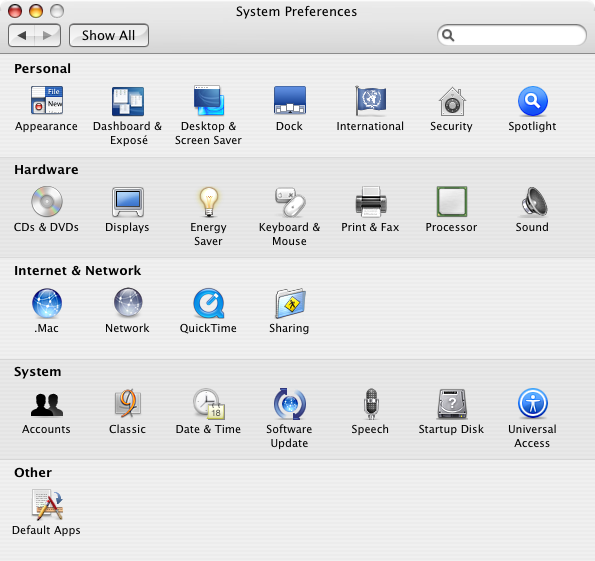
This shows RCDefaultApp as it appears in System Preferences.app.

Views :3778

Popularity: 3% [?]

Got iPad

September 11th, 2010 2 comments

After waiting for so long, we got my iPad. You can’t believe how much happy We are.

Thanks goes to my friend shanaz kanon apu and here husband for bring this iPad from japan.

It’s an gift to my wife Tania sabnam.

Right now writing this post from iPad. Will upload real photo soon.

Views :2903

Popularity: 2% [?]

Categories: My Computer Tags: ,

playing too much games

May 16th, 2010 4 comments

I am also feeling myself that i am playing too much computer game. i should stop now. lot’s of my pet projects are pending, even the avro team waiting for me to submit the avro linux version code to debian/ubuntu repository :( . i should should stop now.

Anyway let me share you which game i am playing now a days.

1. AOE2 – (http://www.microsoft.com/games/age2/) though its a very old game, but still i love it. it prove that “old is gold”

2. AOE3 – ( http://www.ageofempires3.com/) it’s my second fav :) i like the deck :)

also playing some other game, will add more on next post, again going to play aoe3 :)

Views :4908

Popularity: 2% [?]

Categories: games Tags: , , ,

Download iPhone SDK using wget

August 28th, 2009 8 comments

If you are using slow connection like me and trying to download the apples iPhone SDK , then you already know how much tough it is , because of apple only allow to download this file after login. And non of the download manager can give you the resume facility. so after trying 2 days with different downloaders i tried wget and got sucess :D

Here i am discribing how to do it. First login to http://developer.apple.com/iphone (if you don’t have any account, just create one, it’s free). then use firefox extension to export (firebug+firecookie) cookie to cookie.txt . Then rest of the task simple. just copy download link from http://developer.apple.com/iphone and give the following command in the console.

$cd /path/to/cookie.txt

$ wget -ct 0 –load-cookies cookie.txt your_file_url

that’s all, now you can resume download without any problem. Here is the command i used to download to download it.

$ wget -ct 0 –server-response –load-cookies cookies.txt http://developer.apple.com/iphone/download.action?path=/iphone/iphone_sdk_3.0__final/iphone_sdk_3.0__leopard__9m2736__final.dmg

If this post help you, don’t forget to share it with others.

Views :7257

Popularity: 4% [?]

Categories: iphone, mac, Tricks Tags: , , ,

my book on cacti

July 8th, 2009 32 comments

hi all,

today is my one of the happiest day of my life. today packtpub (www.packtpub.com) declared a new book on cacti that going to release this month. and i am one of the author of that book :)

all credit goes to my wife tania sabnam :) , without your help, it was not possible for me . love you.

my first book on cacti

my first book on cacti

here is the books url http://www.packtpub.com/cacti-0-8-network-monitoring/book :)

buy from amazon: cacti 0.8 network monitoring

Views :7279

Popularity: 3% [?]

my psp :)

March 27th, 2009 10 comments

last month i was too busy with my office work and another secrate work (i will declare it very soon). in that time suddenly i bought a cool psp 3006 :) . all credit goes to my wife & girl friend tania sabnam :D

psp 3006

psp 3006

i am really happy with it’s performance. games i played:

1. god of war

2. burnout legends

3. full auto 2

4. capcom collection (20 games)

5. GTA

6. mercury meltdown

7. SOCOM

why not join with me :P

Views :9873

Popularity: unranked [?]

Categories: psp Tags: ,

Website optimization 02: enable deflate /output compression (debian/ubuntu)

November 14th, 2008 2 comments

On the first post of this series we learned how to disable etags. in this post we will learn how to enable output compression.

Before enable this, let me introduce what deflate do. deflate is apache module, that main task is to compress all the output before serving or sending to client.

Nowadays most of the browser are enough expert to handle this. Here main technique is , apache will send the output in compressed format, after receiving this output your browser will uncompress it and render the formated output.

This tricks will really improve your site performance, because user will get your site with less time and bandwidth.

Let me give you an example: let’s think if you are using jquery javascript library that size is 94 Kilo bytes, but if you enable the deflate with default configuration, it will be only 14 Kilo bytes. unbelievable right ? believe me, it’s true. And we are using this on our most popular product http://www.somewhereinblog.net .

OK, now i am showing how you will do this:

first of all you need to enable deflate module. You know i am debian fan, so i am giving commands for debian linux, other linux/unix commands will almost same. as ubuntu is comes from debian, these commands will also work for ubuntu

Open a new terminal and give this command.
sudo a2enmod deflate

it will enable deflate. Wait, you are not finish yet. little work left.
create new file called deflate.conf in your apache conf.d folder. and paste the following code:
<Location />

# Insert filter
SetOutputFilter DEFLATE

# Netscape 4.x has some problems…
BrowserMatch ^Mozilla/4 gzip-only-text/html

# Netscape 4.06-4.08 have some more problems
BrowserMatch ^Mozilla/4\.0[678] no-gzip

# MSIE masquerades as Netscape, but it is fine
BrowserMatch \bMSIE !no-gzip !gzip-only-text/html
# Don’t compress images
SetEnvIfNoCase Request_URI \
\.(?:gif|jpe?g|png)$ no-gzip dont-vary

# Make sure proxies don’t deliver the wrong content
Header append Vary User-Agent env=!dont-vary

</Location>

save the file, and restart apache.

sudo /etc/init.d/apache2 restart

that’s all. now you can see the different.

**if you have not enabled header module of apache, please remove the line “Header append Vary User-Agent env=!dont-vary” from deflate.conf .

For more customization or option of deflate, please visit http://httpd.apache.org/docs/2.2/mod/mod_deflate.html

Views :5764

Popularity: unranked [?]

WordPress with full bangla language support

November 8th, 2008 24 comments

Day by day more blog are coming. It’s really great news for everyone. As lot’s of bengali are asking me about WordPress bangla language file. here it is :) .

In this post i wrote a little “howto” to translate or use WordPress in bangla.

First of all you need to checkout latest language pack form meghdut site.

Open your terminal and give the under given command (if you already installed subversion otherwise search google how to install subversion)

svn co http://svn.automattic.com/wordpress-i18n/bn_BD/trunk/messages/ .

This command will checkout latest language pack from subversion repository. or you can open http://svn.automattic.com/wordpress-i18n/bn_BD/trunk/messages/ in your browser and right click on bn.mo file and select “save link as”.

Now you need to upload these files to your WordPress installed directory.

First make a folder called languages in wp-includes/ then upload these files to that language files.

Or if you are maintaining you WordPress (that i always suggest) then enter to that language folder then execute this command

svn co http://svn.automattic.com/wordpress-i18n/bn_BD/trunk/messages/ .

it will download latest langugage pack from subversion repository. more over if the repository file updated just run “svn up” on languages folder, it will get latest update from repository.

Now you need to configure your WordPress to use this new language files. so edit your wp-config.php file that you will get in the root folder of your WordPress directory.

replace define (‘WPLANG’, ”); with define (‘WPLANG’, ‘bn_BD’);

save it , done :)

open your blog in any browser and see the magic :)

**all the string will not comes with bangla, you will need to edit some values from your admin panel also, like the titles of widgets.

If you have time please visit this page and help them to translate WordPress :)

For writing bangla, you will need the bangla writing plugin that you will get here.

**i wrote this tutorial in short time, so may have some mistake, please inform me in comments.

Views :9363

Popularity: 3% [?]

68 queries in 1.310 seconds